Food Recalls & Alerts
- 4.4
- Rating
- 50.00K
- Installs
- Free
- Price

 Analysis by App-foxy
Food safety is one of those subjects I usually think about only after seeing a worrying headline. That is why I found Food Recalls & Alerts useful: it puts food-recall information into an app instead of leaving me to search several websites whenever I hear about a possible contamination problem. It is a free Food & Drink app from SmartAddress, Inc., aimed at people who want a quicker way to stay aware of recalled products.
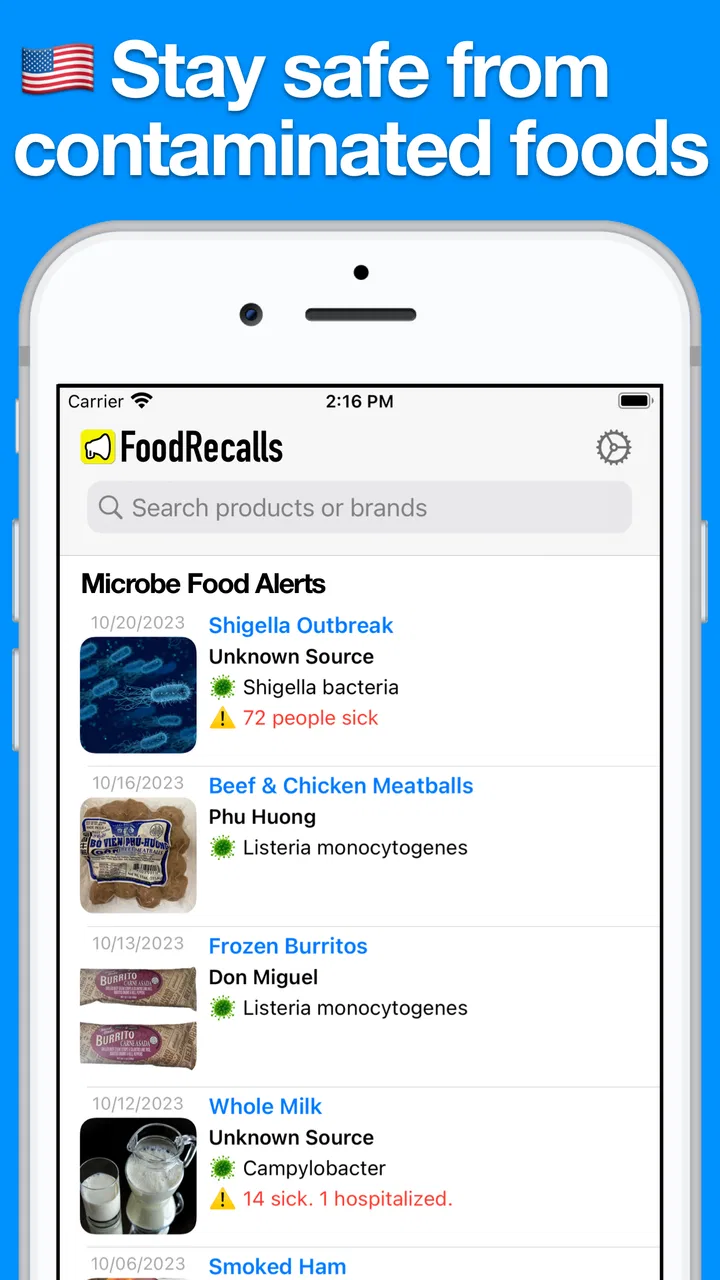
I would not describe it as a replacement for common sense, official food-safety guidance, or checking a product carefully. I see it more as an extra layer of awareness. Its purpose is especially clear for families, people with serious food allergies, caregivers, and anyone who regularly buys packaged food for someone else. The store summary uses strong language about contaminated foods, but my practical view is simpler: the app can help you notice a recall sooner and decide whether a product deserves a closer check.
What to expect before you begin
The first thing to understand is that this is an alert-focused tool, not a recipe app, grocery planner, nutrition tracker, or restaurant-discovery service. If you install it expecting meal ideas or a searchable database of every food product, you may find the experience narrower than expected. Its value comes from keeping recall information close at hand and making it easier to react when something you bought might be affected.
You May Also Like

 AccuWeather: Weather Radar
AccuWeather Review: A Quick, Clear Forecast for Everyday Decisions
For everyday plans, the best forecast is the one you can understand quickly. AccuWeather makes rain timing, radar, and local conditions easy to act on, with a few trade-offs.

 Hill Climb Racing
Why Hill Climb Racing Still Turns Crashes Into One More Run
A tiny car, a bumpy hill and one more upgrade: Hill Climb Racing keeps resurfacing because its simple chaos makes every near-miss feel personal.

 AliExpress - Shopping App
AliExpress Makes Global Shopping Feel Personal, but Shoppers Bear the Risk
AliExpress turns a global marketplace into a pocket-sized discovery engine. Its reach is useful, its shopping loop compelling, and its trade-offs easy to miss.

 Lords Mobile: Kingdom Wars
Lords Mobile Is a Kingdom-Building Routine, Not a Quick Match
A case-by-case verdict on the building, battles, device demands, and social commitments that make Lords Mobile rewarding for some players and exhausting for others.

 PDF Scanner app - TapScanner
TapScanner Makes Paperwork Easier to Capture, Check, and Share
TapScanner makes scanning with a phone feel less like a rescue operation and more like a dependable step in getting work done. Its capture tools are useful, though not flawless.

 Block Blast!
 Shows How Much a Puzzle Game Can Leave Out
A quiet grid game shows why puzzle players increasingly value instant clarity, repeatable skill and low-pressure play—and where the genre still needs to catch up.
More From Our News Desk
View All News


The app has an average rating of 4.4 from around 2.3 thousand ratings, and it has passed the 50 thousand install mark. Those figures suggest that it has found a real audience without pretending to be a universal food-management platform. I think that positioning matters: the app is best judged by how clearly it helps with recall awareness, not by whether it offers the broad feature set of a supermarket or health app.
It is marked for Everyone, which makes sense for a household safety tool. A parent can use it while shopping, an adult child can keep it in mind when helping an older relative, and a roommate can check an alert before serving a shared meal. The app is free to install, although in-app purchases range from $3.99 to $99.99 per item. I would therefore look carefully at any purchase screen and decide whether the free experience already covers your needs before spending money.
One useful expectation to set is that an alert is a starting point, not automatic proof that the food in your cupboard is dangerous. Recalls often depend on details such as the product name, package size, lot information, or date marking. Even when an app presents a warning clearly, I still compare the notice with the label in my hand. That small habit prevents two opposite mistakes: throwing away an unaffected product or ignoring a warning because the brand name merely looks familiar.
Installing it without overthinking the decision
Food Recalls & Alerts was released on November 3, 2021, and the current version is 3.9.1. It supports Android 7.0 and later, so people using older phones should check compatibility before planning around it. On a supported device, installation is straightforward, but I recommend opening the app when you have a few quiet minutes rather than waiting until you are standing in a crowded supermarket.
That timing makes a difference because the first useful moment is not simply seeing the home screen. The real success is understanding how the app presents an alert and knowing what information you need to compare with a package. If you rush through setup, you may remember only that a warning exists without learning how to judge whether it applies to your purchase.
I also suggest keeping the app somewhere easy to reach instead of burying it in a folder with unrelated downloads. Recall checking is an occasional task, so the app may not become part of your daily routine. A visible icon or a place in your food-related tools makes it more likely that you will open it when a news report, message from a family member, or supermarket notice raises a question.
Turning the first opening into a useful check
For a first meaningful action, I would use a product already in your kitchen rather than browsing randomly. Pick a packaged item that you buy often, place the package beside the phone, and inspect the alert information with the product label available. This gives you a concrete reason to learn the app and teaches you the comparison habit that matters most.
Start with the product identity, then look for the identifying details shown in the notice. Do not stop at a matching brand. If the alert includes a particular variety, package description, lot code, or date, compare those details one by one. The quickest workflow is to keep the physical item in view while reading, because relying on memory makes similar products easier to confuse.
If the details do not match, I would not treat that as a reason to dismiss the entire alert. I would record the product as apparently outside that notice, then continue checking the rest of the information. If the details do match, separate the item from food that is ready to eat and follow the instructions associated with the recall notice. The app can help you notice the problem, but the safe response still depends on reading the notice carefully.
This first check also answers a question many new users have: does the app make the decision for you? In my view, no, and that is appropriate. A recall tool can organize warnings, but it cannot inspect your package, know how it was stored, or replace the instructions attached to a specific notice. The person holding the product still has to make the final comparison.
A realistic kitchen scenario
Imagine that I am preparing sandwiches for a family lunch and hear that a packaged food category may have been recalled. Instead of searching the web while trying to cook, I open Food Recalls & Alerts and look for the relevant notice. I take the package from the refrigerator, compare its brand and product description with the warning, and then check the identifying marks rather than guessing from the front label.
If the package appears included, I keep it away from the other ingredients and avoid serving it while I read the notice’s next instructions. If it does not appear included, I still understand why the warning was issued and can check other packages from the same shopping trip. That is the kind of small, realistic action where the app earns its place: it shortens the distance between hearing about a problem and checking what is actually in my home.
The same approach works when shopping for another person. If a relative has a severe allergy or a health condition that makes food contamination especially serious, I would not rely on a quick glance at an app notification alone. I would use the app to identify the notice, then verify the exact product before buying or serving it. The extra minute is worthwhile because a similar-looking package can have different identifying details.
Where the experience needs a little care
I find the most useful way to approach recall alerts is to treat them as a prompt for a careful check, not as a verdict on every similar-looking product. In this section, I’ll focus on the small habits that make the app more practical in a real kitchen, especially when a warning arrives at an inconvenient moment. That extra care helps turn concern into a clear next step.
Alerts are helpful, but attention still matters
The main friction is built into the subject itself: recall information can be urgent, but it is rarely simple. A short alert may be easy to understand at a glance while still requiring a careful label comparison. People who want a single tap that says “safe” or “unsafe” may find the app less reassuring than expected. I prefer to see that limitation clearly rather than treat a broad warning as a final verdict.
Another point is emotional balance. Food-contamination warnings can make an ordinary grocery trip feel alarming, especially for someone who already worries about allergies or illness. I find the most sensible approach is to use the app as a checklist, not as a reason to panic. Read the notice, identify the product, isolate it if necessary, and follow the stated guidance. That sequence is more useful than repeatedly refreshing alerts without taking a practical action.
People who already monitor official recall channels may wonder whether they need this app. If you are comfortable searching those sources, saving notices, and checking them regularly, the app may not change your routine much. Its advantage is convenience and focus. Someone who rarely remembers to look for recalls is more likely to benefit than someone who already has a detailed system.
It is also not the right choice for someone seeking individualized medical advice. The app can support awareness, but it cannot tell you how a possible exposure affects your body or replace a clinician’s guidance. If you have symptoms or a serious allergy concern, I would treat the app as background information and use appropriate professional or emergency help instead.
How I would handle paid options
Because the app is free but includes in-app purchases from $3.99 to $99.99 per item, I would take a deliberate approach to upgrades. I would first use the basic experience during a normal recall-checking situation and ask whether it already solves the problem I installed it for. If it does, there is no reason to buy something simply because a premium option appears.
If you are considering a purchase, read the wording on the screen carefully and make sure you understand what it changes for your own routine. A frequent shopper managing food for several people may see more value in additional convenience than a person who checks recalls only a few times a year. The important trade-off is not the existence of paid options; it is whether they reduce enough effort to justify the cost for your household.
I would also avoid making a purchase while distracted by a worrying alert. First deal with the food-safety question, then return to account or purchase decisions when you are calm. That separation keeps the app’s safety purpose from becoming mixed with an impulse payment.
Who will get the most from it
I think the strongest audience is people who want a dedicated place for recall awareness without turning food safety into a complicated project. Parents checking lunch ingredients, caregivers shopping for someone else, and households that buy many packaged foods can all benefit from having a focused tool nearby. It is also useful for a person who hears about a recall secondhand and wants to investigate immediately instead of trusting a vague social-media post.
The app is less compelling for someone who wants broad food planning, detailed nutrition information, restaurant recommendations, or a full grocery-management system. Those needs call for different tools. I would also hesitate to recommend it as the only safeguard for a household with a life-threatening allergy. In that situation, careful label reading, medical advice, and established safety routines remain more important than any single app.
For first-time users, the best next step is simple: install it, open one alert, and practice matching it against one package you own. That exercise shows whether the presentation feels clear on your phone and helps you build a repeatable habit. Keep the package details visible, avoid assuming that a brand match is enough, and treat every warning as information to verify rather than a substitute for judgement.
After that, I would keep the app available for occasional checks around grocery shopping and shared meals. Its greatest strength is not that it makes food safety effortless; it is that it gives a concerned user a practical place to begin. Use it to notice, compare, and act carefully. That is a modest role, but for Food Recalls & Alerts, it is the role that makes the app worth keeping.
FAQs for Food Recalls & Alerts
01What is Food Recalls & Alerts, and what does the app do?
Food Recalls & Alerts is designed to help users stay informed about recalled food products and related safety warnings. After reviewing its main features, the app appears most useful for people who want recall information gathered in one place instead of checking several government or news websites. Depending on the available region and settings, alerts may include product names, brands, recall reasons, affected lots, dates, and safety instructions.
02How does Food Recalls & Alerts notify me about new recalls?
The app generally relies on notifications and regularly updated recall information to keep users aware of new food-safety events. You may need to allow push notifications when installing or opening the app, and some alerts can depend on your selected country, categories, or preferences. It is worth checking the notification settings carefully, because disabling background updates or alerts could prevent timely warnings from appearing on your device.
03Is Food Recalls & Alerts available in every country?
Food recall systems are usually managed by national or regional authorities, so the app’s coverage may vary depending on where you live. Before downloading, check whether the listed recalls come from agencies relevant to your country and whether local products are included. Users traveling or living outside the primary supported region should treat the app as an additional source of information and consult their local food-safety authority when necessary.
04Can I search for a specific product, brand, or food recall?
The app is intended to make recall information easier to review, and users may be able to browse or search alerts by product, brand, category, date, or recall reason. Search options can differ between versions, however, so you should not assume that finding no result proves a product is safe. Always compare packaging details such as lot numbers, expiration dates, and UPC codes with the official recall notice.
05Is Food Recalls & Alerts free, and does it require personal information?
The basic download may be free, but availability of premium features, advertising, subscriptions, or in-app purchases can depend on the platform and current version. During setup, review the requested permissions and privacy information before accepting them. A food-alert app may need notification access and internet connectivity, but it should not require unnecessary personal data for basic recall browsing. Also confirm whether mobile data usage or account registration is required.
Pros
- Covers recalls from multiple food categories in one place.
- Provides useful details such as affected products and recall reasons.
- Can help users check products before serving them to family.
- Simple alert-based format makes urgent notices easy to spot.
- Helpful for shoppers with allergies or food safety concerns.
Cons
- Coverage may vary depending on your country or region.
- Some alerts may arrive after products have already been purchased.
- The app does not replace checking packaging and expiration dates.
- Frequent notifications may feel excessive during major recall periods.
- Older recall notices may remain relevant but require manual follow-up.

Food Recalls & Alerts
Gallery